Email List Building Checklist for Beginners (Simple + Fast)
Email List Building Checklist for Beginners (Simple + Fast)
If you want a simple online business, an email list is one of the most “boring but powerful” things you can build. It’s permission-based. People raise their hand and say, “Yes, send me more.”
This isn’t about being clever. It’s about being consistent.
In this guide, you’ll set up the basics in the right order so you don’t waste time fixing things later. You’ll also get a simple weekly routine that keeps your list growing without being pushy.
This guide is a simple email list building checklist you can follow step by step, even if you’re not techy.
What is an email list, and why does it matter?
An email list is a group of people who have chosen to hear from you. You’re not chasing strangers every day. You’re talking to people who already said “yes.”
Social platforms change. Posts get buried. But email is direct. When you send a message, it lands in a place people check.
That’s why the goal is: opt-in first, then a soft click later. Build trust first. The click comes later.
What should you set up before you try to get subscribers?

Before you try to “grow,” set up the path people will walk.
You need three basics:
- A place to collect emails (a form + landing page)
- A place to store emails (an email service provider)
- A first message (a welcome email)
If you skip this, you’ll end up collecting emails with no follow-up. That’s like inviting people over, then not opening the door.
How do you choose a lead magnet people actually want?
A lead magnet is a small freebie that solves one tiny problem fast. Not a giant course. Not a 40-page eBook.
Good lead magnets are:
- Specific (one problem)
- Quick (5–15 minutes to use)
- Practical (checklist, template, swipe file)
Examples:
- “Starter checklist for building your first email list”
- “3-email welcome sequence template”
- “Landing page copy fill-in-the-blank”
Pick something you can create in one sitting. Do this once, document it, and reuse it — that’s the leverage.
What goes on a simple opt-in landing page?
Keep it simple. Your page has one job: help the right person say “yes.”
Include:
- A clear headline (what they get)
- 3–5 bullets (what it helps them do)
- A short “who this is for” line
- One call-to-action button
- Optional: a small screenshot of the freebie
Avoid clutter:
- No big menu
- No 10 different offers
- No long life story
If your page feels messy, don’t redesign everything. Stop fixing things that aren’t broken. Fix the part you’re avoiding: the clear promise.
How do you connect your form, email tool, and thank-you page?
This is the “plumbing.” It sounds scary, but it’s just a few connections:
The basic flow
- Form submits email
- Email goes into your list/tag
- Subscriber gets a thank-you page (or a confirmation email)
- Welcome email sends automatically
The 2-minute test
Test it like a customer. Use a second email address and sign up. Make sure:
- The freebie is delivered
- The welcome email arrives
- The links work
If you’re not sure what “best practice” looks like, stick to beginner-friendly guidance from sources like HubSpot Academy and Google Search Central (they’re focused on helpful, permission-based communication).
https://academy.hubspot.com/
https://developers.google.com/search/docs
If you only do one thing today, use this email list building checklist and don’t skip the testing step.
What should your first welcome email say?
Your first email should do three simple things:
- Deliver the freebie (or show where it is)
- Set expectations (how often you’ll email, what you’ll share)
- Start trust (one small story + one helpful tip)
A simple welcome email structure:
- Subject: “Here’s your [freebie]”
- Line 1–2: “Thanks for grabbing it — here it is.”
- 3 bullets: what to do first
- One question: “What are you working on right now?”
- Short sign-off
Keep it human. No hype. No pressure.
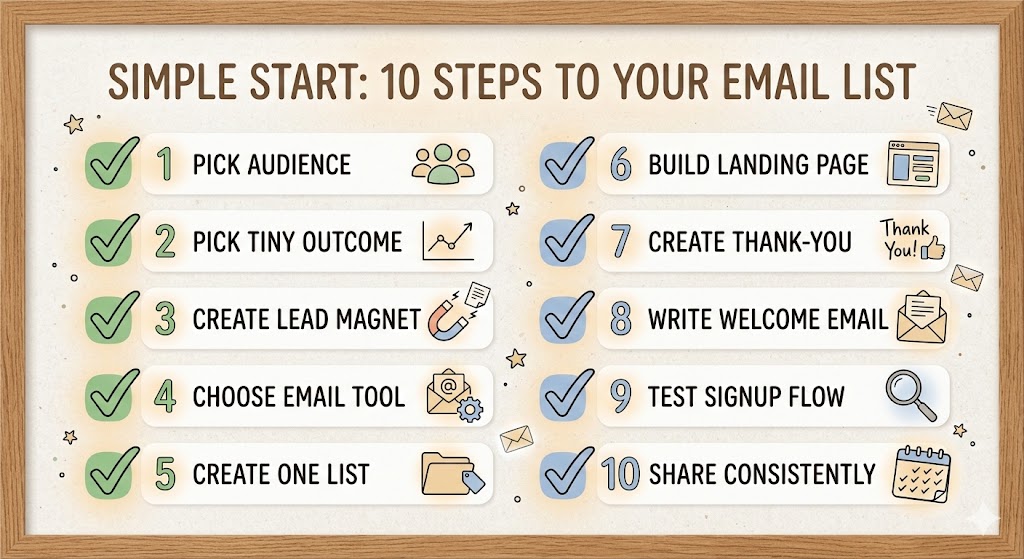
Email list building checklist: what to do step by step
Use this as your “do it in order” list:
- Pick one audience (who you help)
- Pick one tiny outcome (what they want first)
- Create one lead magnet (checklist/template)
- Choose an email tool (basic plan is fine)
- Create one list (or one tag)
- Build one landing page (headline + bullets + form)
- Create one thank-you page (next step + link)
- Write one welcome email (deliver + expectations)
- Test the full signup flow (use a second email)
- Share your landing page in one place consistently (daily/weekly)
If you want a simple “start here” page to plug into this flow, use this: https://melvinleforbes.com/web
How do you get your first subscribers without being pushy?
Start where you already have attention:
- Your social bio link
- A pinned post
- Your email signature
- A simple blog post (with the opt-in inside)
- A helpful comment (when it truly fits)
The key is matching the freebie to the moment. If someone is asking “how do I start?”, your checklist is a natural next step.
For basic traffic education, Moz’s beginner SEO guide is a helpful starting point if you’re writing blog posts to support your opt-in.
https://moz.com/beginners-guide-to-seo
What weekly routine keeps your list growing?
A beginner-friendly weekly routine:
- One day: write one helpful email (teach one small thing)
- One day: share your opt-in link (with a short tip)
- One day: improve one thing (headline, bullets, welcome email)
That’s the whole loop. Consistency beats complexity.
If you keep a learning hub on your site, link it here so readers can binge the basics next (example: https://melvinleforbes.com/blog).
What mistakes slow beginners down?
Common slowdown mistakes:
- Creating a lead magnet that’s too big
- Waiting until everything is “perfect”
- Changing tools every week
- Sending nothing after people opt in
- Asking for a sale too early
Remember: Build the trust first. The click comes later.
Frequently asked questions about starting an email list?
Do I need a website to start an email list?
No. You can start with a simple landing page from your email tool or a basic page builder. The key is one clear opt-in page and one welcome email.
How many emails should I send per week?
Start with one. One helpful email per week is enough to build trust and train consistency. This isn’t about volume—it’s about showing up.
What should my lead magnet be if I have no idea?
Pick the smallest problem your audience has right now and solve it in one page. A checklist is usually the easiest place to start.
Should I use double opt-in?
If your tool recommends it, it’s fine. Double opt-in can improve list quality because subscribers confirm they want your emails.
What if nobody signs up?
Don’t rebuild everything. Improve one part at a time: the promise, the headline, the bullets, or where you share it. Consistency usually wins before complexity.
Is it okay to promote something to my list?
Yes—after you’ve helped first. Teach, build trust, and then share a relevant next step. Build the trust first. The click comes later.
What’s the fastest thing I can do today?
Create the simplest lead magnet (1 page checklist), connect your form, and write one welcome email. Then share the opt-in link in one place you already post.
Save this email list building checklist and repeat the weekly
routine for 4 weeks before you change anything.
NEXT STEPS:
- Pick one audience and one tiny outcome for them
- Create a 1-page lead magnet (checklist or template)
- Build a simple landing page with one clear promise
- Write a welcome email that delivers and sets expectations
- Share your opt-in link once a week for 4 weeks
Disclosure: Some links may be affiliate links, which means I may earn a commission at no extra cost to you.
CTA:
If this clicked for you and you want to go deeper into practical, real-world online marketing, here’s where I’d send you next:
- Some of the links on this page are affiliate links.
That means if you choose to purchase through them, I may earn a commission at no extra cost to you.
I only recommend tools and trainings I genuinely believe can help you build a real, sustainable online business. - Learn more: Browse more guides on the blog – https://melvinleforbes.com/blog
- Who’s Mel? Get the backstory and see how I think about simple online business – https://melvinleforbes.com/about-mel
- Watch the free training: This replay walks you through how to think about offers, funnels, and simple systems you can start using today – https://melvinleforbes.com/web.